
The key compliance obligation with Right To Work checks is the sighting of Proof of Work Rights documents NOT actually the collection and retention of these documents.
This is why each Self-Onboarding Right To Work check in vSure must be reviewed. It is in fact the review process that creates the audit trail for "who performed the review of the proof of work rights documents, on what date at what time". It is this audit trail that Borderforce or SMETA auditors are interested in, not copies of the actual documents.
You will get Notified when the employee/candidate completes their uploads - see Notifications article.
vSure offers a smart workflow to do this via the Onboarding Status tab:
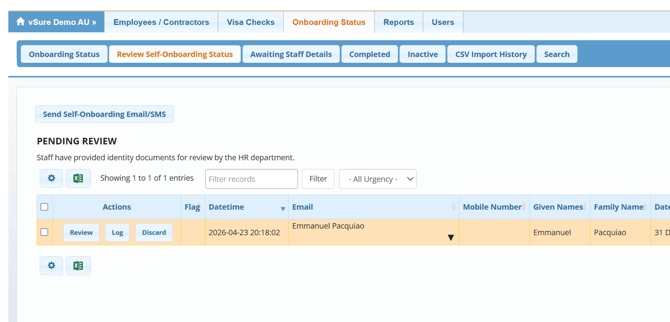
It is important to regularly go to the "PENDING REVIEW" section to review any onboards that have been complete. Simply click on the row to view (and approve or reject) the documents submitted.
The Flag represents data cross-matching and machine learning validation. An onboard submission will flag when there are discrepancies, such as:
- The details (name and DOB) submitted by the employee vary from the details obtained from the image/photo of the identity document including passport;
- The name against the visa returned from home affairs does not exactly match the name submitted;
- They have said No to Student Visa but in fact have the 8104 or 8105 Student visa condition
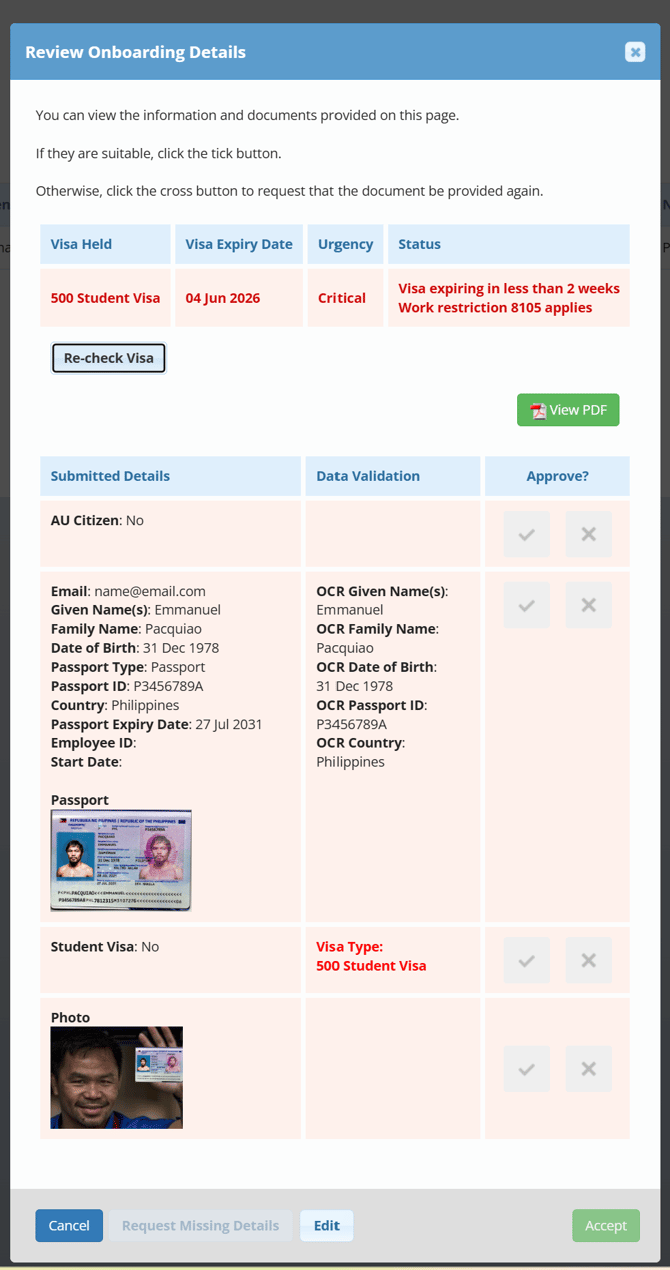
Tick to accept the image/document and acknowledge it in the system as "sighted". An audit trail of who sighted the document on what day at what time will be created.
Select the X to reject the document (you can resend a request for the rejected document by clicking the "Request Missing Details By Email" button at the bottom.
*** You can now complete reviews in bulk, using our In-Line Review