
You can now move staff and all their documents between different sub-accounts within the same vSure Multi-Account.
Move To Current In Existing Sub-Account
At this stage ONLY Current employees can be moved.
If the employee is currently in Prospective OR Previous tab/status within the existing sub-account, then step 1 is to move them to Current status/tab.
1. Previous or Prospective Tab
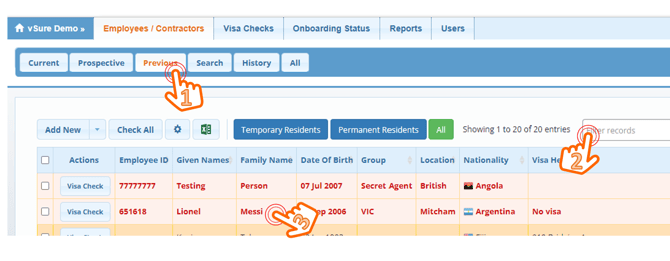
2. You can filter to find the employee/contractor
3. Click on their name in the grid
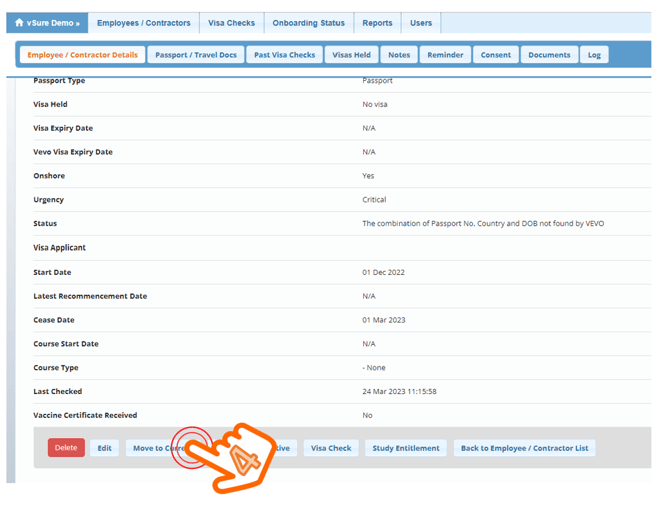
4. Scroll to the bottom of the employee/contractor's details page and simply click Move To Current
Now move the employee/contractor between sub-accounts
At the top (head office / white-label) level - not within any sub-account, navigate to the All Staff Tab
1. All Staff
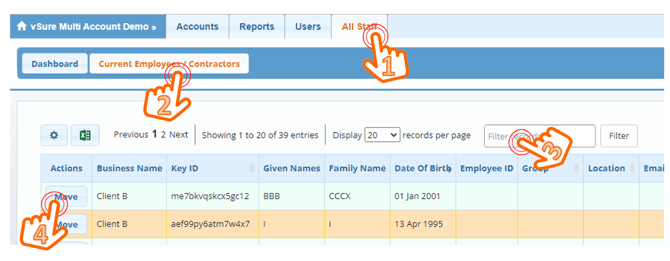
2. Current Employees / Contractors
3. Use the Filter function to search for the employee/contractor
4. Click the Move button next to their name
5. Select the sub-account you want to move them to
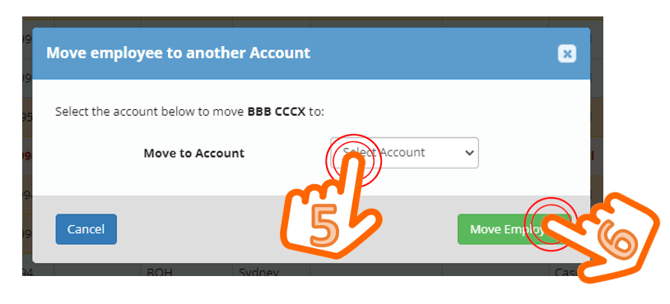
6. Hit the Move Employee Button