
JobAdder is a recruitment platform that helps thousands of recruitment professionals and millions of job seekers every year.
vSure - Australia's leading work rights compliance platform, integrates with JobAdder to streamline employee visa and work rights management.
Here are just some of the ways that the JobAdder and vSure integration can help transform your work rights compliance:
- Automate a Right To Work check from vSure, for a candidate in JobAdder
- No more VEVO checks, vSure seamlessly maintains the work rights information
- vSure interprets visa information beyond a VEVO check (e.g. whilst VEVO will always show 8104/05 restriction on student {48 hours per fortnight}, vSure collects student information to determine exemptions) and when the Actions button, Check Work Rights is triggered in JobAdder, it displays the Work Rights information against the candidates profile;
Points of Seamless Data Flows
The standard points of data flow between vSure and JobAdder:
- New candidate in JobAdder, when ready you can trigger a new Self-Onboarding RTW request sent from vSure via email and/or SMS;
- A completed and reviewed Self-Onboarding RTW request in vSure will display when requested in JobAdder within the Candidate profile with the appropriate work rights;
How It Works
vSure Integrations Service Setups
Depending on which of the options of integration you would like to use, each of these can be opted in or out of.
- Send Self-onboarding RTW - Where a candidate in JobAdder, can be sent a Self-Onboarding RTW request sent from vSure via email and/or SMS;
- Write completed self onboarding status - A completed and reviewed Self-Onboarding RTW request in vSure will display when requested in JobAdder within the Candidate profile with the appropriate work rights;
Required setups in JobAdder
- Candidate Status - So that you know where your employee is at during the vSure Work Rights check process, so we can send a 'Status' back to the JobAdder Candidate. Under Account | Admin Settings | Candidates | Status, we suggest adding the following Status types that link to the various stages of the vSure Work Rights check: (Status change note type = Status Change)
- vSure: Self-Onboarding Request Sent
- vSure: Upload complete Ready For Review
- vSure: Complete - No Restriction
- vSure: Complete - Restriction
- vSure: Complete - Important
- vSure: Complete - Critical
- Candidate Document Types - Under Account | Admin Settings | Candidates | Document Types - Create a document type for the Work Rights Check pdf document. eg vSure Work Rights Check.
Connect vSure and JobAdder via the vSure Integrations Service
The vSure and JobAdder integration is based on an oAuth2, token based integration. Your vSure Customer Success Manager will work with you to configure the integration. You will then control the integration via your JobAdder login and your vSure Integration Service login found at https://integration.vsure.com.au/.
You will be sent an email invitation, that will require you to complete two steps to establish connection:
- You will need to verify your account by selecting 'Confirm my account' and then
- Login to the vSure Integration Service, using the details provided to setup the connection between your JobAdder account and vSure.
Integration Service
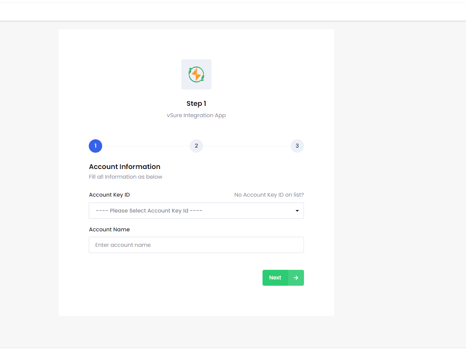
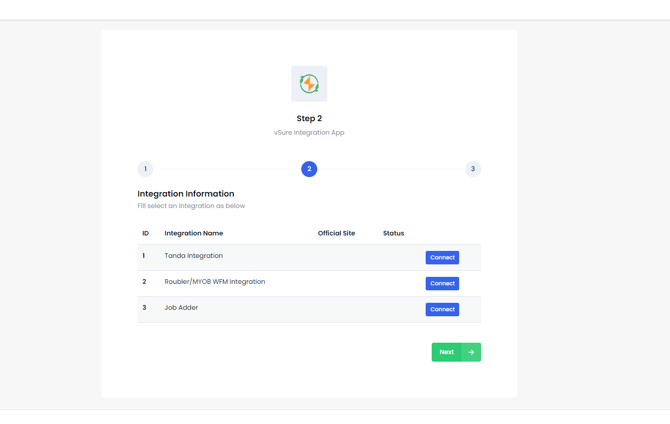
vSure Integrations setup:
Once logged into integration.vsure.com.au
Configurations tab
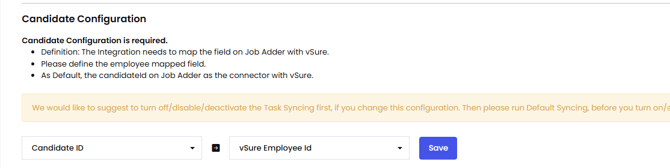
- Candidate Configuration - select the Candidate Id (JobAdder) map to vSure Employee ID, Save.
- Candidate Document Type Configuration - select the Document type you created in JobAdder. This will be the document type that will be used to send the PDF Work rights check from vSure to JobAdder within the Candidate profile. eg vSure Work Rights Check

If the Document Type isnt visible in dropdown, select the 'Syncing' tab and select the blue Sync Now button against JobAdder Candidate Document Type.
JobAdder Candidate Status Mapping tab - map the candidate Status created above in JobAdder to the vSure status. So that in JobAdder you know where your employee is at during the vSure Work Rights check process.
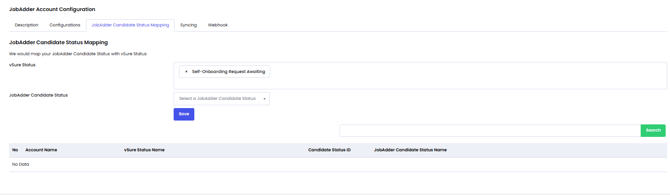
| vSure | JobAdder (recommendation status's) |
| Self Onboarding Request Awaiting |
vSure: Self-Onboarding Request Sent |
| Awaiting Review in vSure |
vSure: Upload complete Ready For Review |
| Complete - No Restriction |
vSure: Complete - No Restriction |
|
Complete - Restriction |
vSure: Complete - Restriction |
|
Complete - Important |
vSure: Complete - Important |
|
Complete - Critical |
vSure: Complete - Critical |
If the JobAdder Candidate Status isnt visible in dropdown, select the 'Syncing' tab and select the blue Sync Now button against JobAdder JobAdder Candidate Status.
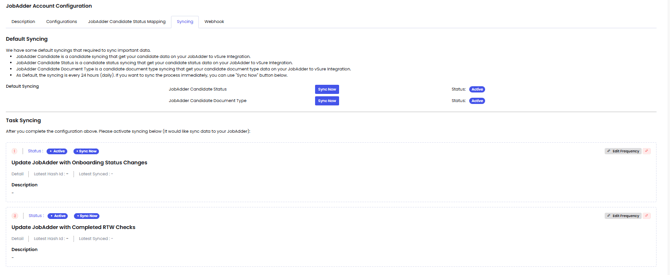
Task Syncing tab
Task Syncing - select inactive against the items of integration you wish to use.
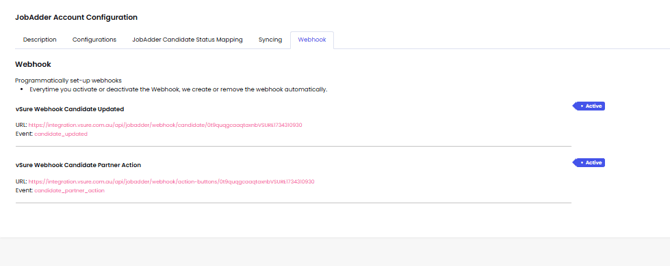
Webhook tab
vSure Webhook Candidate Updated - for the ability when changes are made to candidate details in JobAdder these will update vSure. Select inactive button to Activate.
vSure Webhook Candidate Partner Action - Will create the action buttons against the candidates in JobAdder for the ability to trigger the Onboarding request Send and sync vSure Visa check results
Select inactive button to Activate.
How to use JobAdder and vSure to conduct a Work Rights check
- Select the candidate in JobAdder
- Under Actions, select vSure, Send Self-Onboarding Request.
- This will trigger a Right to Work check from vSure to the employee via email and/or SMS;
- Once the candidate has completed the self onboarding and it has been reviewed by the clients vSure Admin, the candidate Work Rights status will be available to be reviewed, by selecting 'Sync vSure Work Rights Status'. The Candidate status will update based on visa check results and the Document tab will contain the visa check pdf with all details of the check
Disconnecting integration between JobAdder and vSure
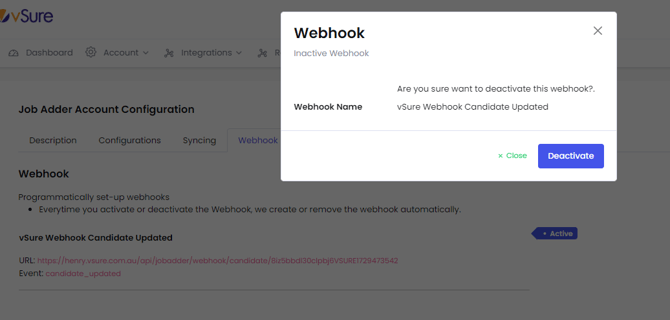
Through the integrations service (integration.vsure.com.au) the display of the Action buttons in JobAdder can be removed at anytime by making the webhooks inactive. This will then remove the ability to:
- Send a RTW Self-onboarding check automatically and remove the ability to see the RTW details in JobAdder
- Employee updates from JobAdder to vSure
What data is shared between JobAdder and vSure
Linking of employees between vSure and JobAdder is managed by Candidate ID.
The candidate data that is shared between the two systems is:
- For creation of the employee self onboarding right to Work For the employee updates
- Changes made in JobAdder, update employee record in vSure. (Webhook = candidate_updated)
| vSure | Job Adder |
| Employee ID | candidateId |
| Given Names | FirstName |
|
Family Name |
LastName |
| Mobile number | Mobile |
Want to know more?
If you are an existing vSure customer, simply log a support ticket here.
If you don't yet have vSure and would like to know more about how vSure can work seamlessly with JobAdder to simplify Right To Work compliance, then reach out here.