
Humanforce provides the market-leading, employee-centre, intelligent and compliant HCM suite for frontline and flexible workforces.
vSure - Australia's leading work rights compliance platform, integrates with Humanforce to streamline employee visa and work rights management.
Here are just some of the ways that the Humanforce and vSure integration can help transform your work rights compliance:
- No more VEVO checks, vSure seamlessly adds the work rights information AND MAINTAINS IT within Humanforce Employee Management;
- vSure interprets visa information beyond a VEVO check (e.g. whilst VEVO will always show 8104/05 restriction on student {48 hours per fortnight}, vSure collects student information to determine exemptions) and sends the right information to Humanforce;
- Employees are sync'd - if an employee's details change in Humanforce, they update in vSure;
- Terminations in Humanforce automatically stop visa monitoring in vSure and move employees to Previous status;
- Activations in Humanforce conversely move employees back to Current in vSure and automate visa monitoring once more;
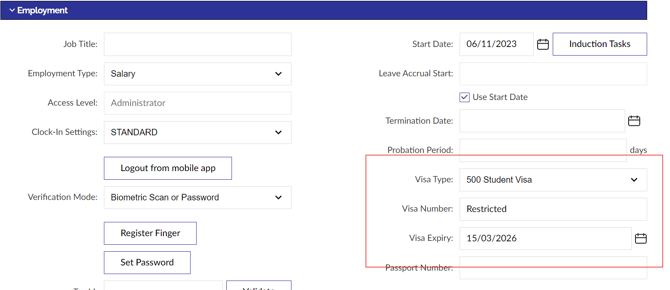
The vSure integration maintains the employee Visa details in the Employment tab in Humanforce
No more manual management of Visa information within the Employment tab in Humanforce, the vSure integration will maintain the up-to-date, interpreted status:
5 Points of Seamless Data Flows
There are 5 standard points of data flow between vSure and Humanforce WFM:
- A completed and reviewed Self-Onboarding RTW request in vSure gets written back to the Humanforce employee profile with the appropriate work rights;
- A change of work rights at any point in vSure, gets updated to Humanforce;
- A change in employee details in Humanforce (such as location or email address), gets updated in vSure;
- A termination in Humanforce = Move to Previous in vSure;
- A Activation in Humanforce = Move to Current in vSure;
How It Works
Connect vSure and Humanforce via the vSure Integrations Service
The vSure and Humanforce integration offers 5 integration workflows. Your vSure Customer Success Manager will work with you to configure the integration. You will then control the integration via your Humanforce login and your vSure Integration Service login found at https://integration.vsure.com.au/.
Your vSure Customer Success Manager will work with you to help you set-up the integration, by populating the integration details screen within the vSure Integration Service:
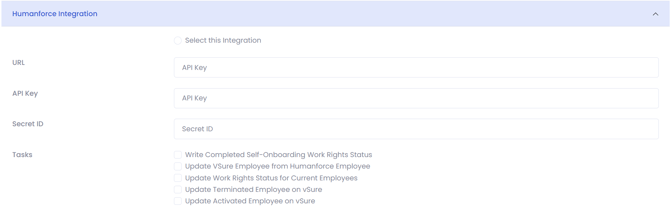
Choice of unique identifier to sync your employees
vSure EmployeeID can be mapped to either of the following Humanforce IDs:
- Employee Code
- Payroll Code
- External ID
Map Humanforce Visa List
As a once off exercise, the vSure team will help to map your vSure visa list (which is in effect, the Australian Department of Home Affairs visa list) to the Humanforce visa list, with a default "catch all" if a new visa appears in vSure and needs to be added to Humanforce.
The following article covers how to setup the visa types in Humanforce How can I create new Visa Types?
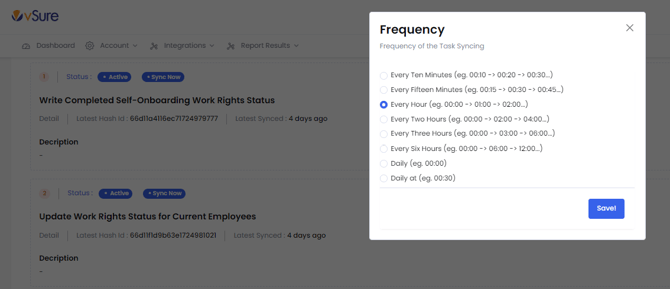
Set the frequency of each of the sync's
Again, the vSure team will help to configure the integration, which allows you to specify the frequency of each of the 5 points of integration that run between the systems:
Want to know more?
If you are an existing vSure customer, simply log a support ticket here.
If you don't yet have vSure and would like to know more about how vSure can work seamlessly with Humanforce to simplify Right To Work compliance, then reach out here.