
You can set-up the default Sender and Message that will be used for SMS onboarding:
1. My Account
2. SMS Defaults
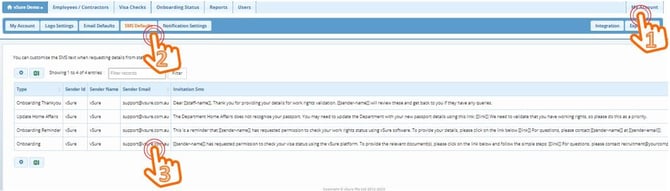
3. Click anywhere in the row to open the Edit function.
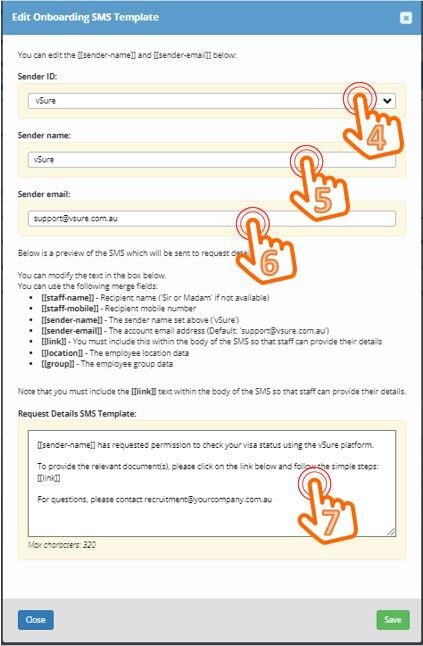
4. From July 1 2023 the Sender ID for SMS's will be regulated by The Australian Communications and Media Authority (ACMA). You will only be able to choose one of our pre-registered Sender IDs:
- vSure
- RTWCheck
- WorkRights
OR you will need to use this registration form to be able to use your own Sender ID.
5. Click in the Sender Name field to edit the SMS sender - you can use any combination of unbroken (no spaces) alpha and numeric characters up to 11.
6. Sender Email - this is for merging in the SMS template area.
7. SMS template - the text and merge fields you want to be the default for your SMS Self-Onboarding. Note: this is limited to 320 characters including the link - which is generally between 60 and 70 characters - so look to use a maximum 250 characters outside the Link merge field.