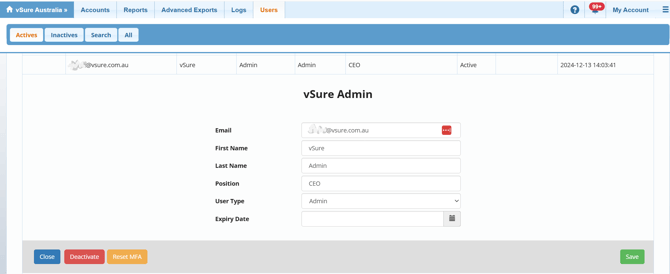
This section explains how to set up standard and admin users for administering visa holders, and how to edit or deactivate a user.
Adding and Editing users in vSure
1. Users

2. Active Users Tab | Add User
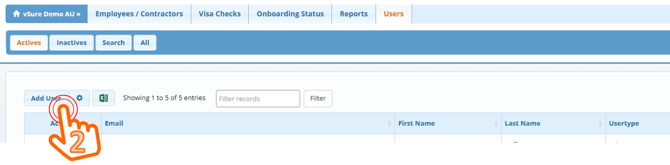
3. Complete the details:
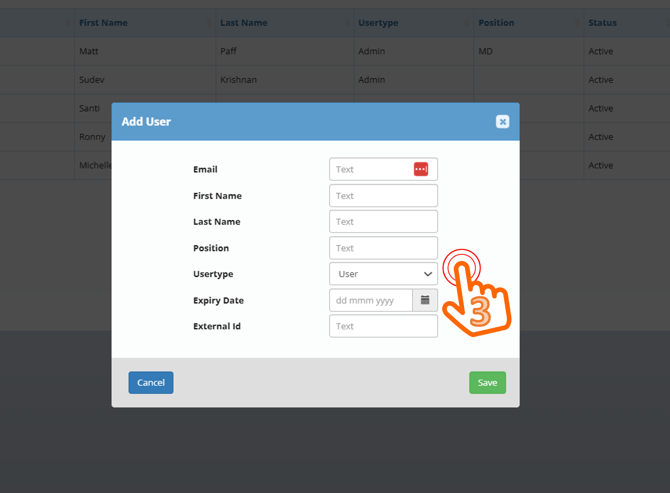
- Email address: must be valid - an email will be sent to this address before verifying the account;
- First Name;
- Last Name;
- Position;
- User Type:
- Admin: has access to all account and user set-ups and all features of vSure;
- User: has limited access, including the ability to add/manage visa holders, receive scheduled reports and manage settings of account.
- Expiry Date: can be used for temporary staff or management of staff access over time;
- External ID: can be used for integration purposes
4. Select Save
On save:
- A user is added to the "Inactives" tab;
- The user is emailed a verification to: click on a link; create a password; set up there Multi-factor Authentication (MFA) and login for the first time;
Once the user has clicked on the verification link, created password and logged in, they will move automatically to the "Active" users tab.
How to Edit, Deactivate or reset MFA for a user.
1. Users
2. Active Users Tab | Select the User
You will then have the ability to edit any fields, reset MFA or deactivate the user